> For the complete documentation index, see [llms.txt](https://wiki.luca.education/llms.txt). Markdown versions of documentation pages are available by appending `.md` to page URLs; this page is available as [Markdown](https://wiki.luca.education/goi-y-s-dung/lich-hoc-thoi-khoa-bieu/doi-tlv-cho-toan-bo-buoi-hoc-o-thoi-khoa-bieu.md).
# Đổi TLV cho toàn bộ buổi học ở Thời khóa biểu
### Hiện tại trên Luca Education CHƯA CHO PHÉP **đổi Trị liệu viên cho NHIỀU buổi học** cùng lúc khi chỉnh sửa Thời khóa biểu.
* Lý do chính là việc này có thể làm trùng lịch dạy của TLV dẫn đến có buổi sẽ được đổi, buổi sẽ không được đổi, gây mâu thuẫn giữa các buổi học.
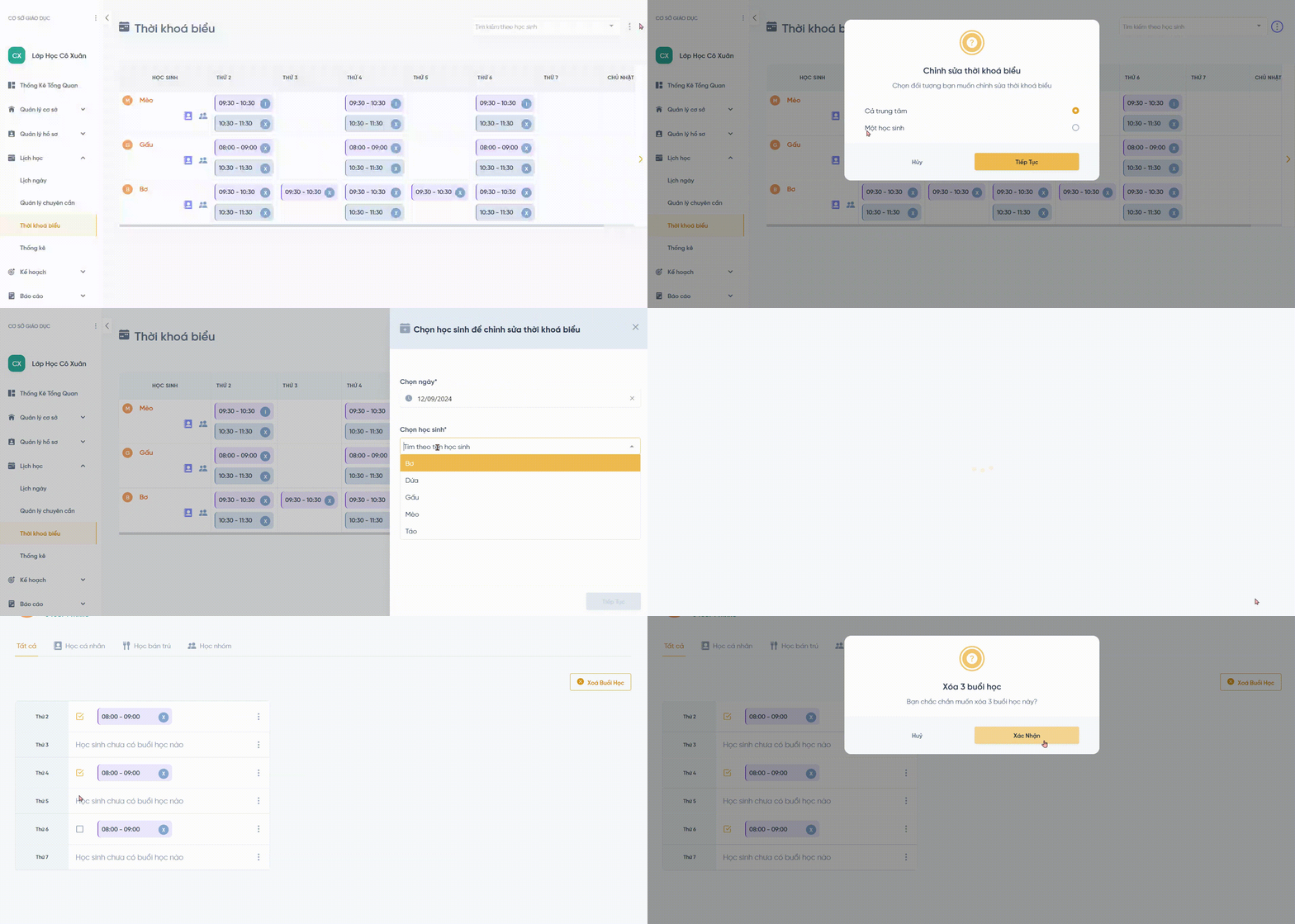
* Vì vậy, Luca đề xuất **xóa nhiều** buổi học cần đổi, sau đó **tạo nhiều** buổi mới, đây là cách nhanh và tiện nhất để đổi TLV cho hàng loạt buổi học
### Hướng dẫn xóa nhiều buổi học
Tại trang chỉnh sửa Thời khóa biểu của học sinh, chọn những buổi học cần xóa, chọn nút **Xóa buổi học**
### Hướng dẫn tạo nhiều buổi học
[Xem hướng dẫn tại đây (có kèm video)](https://wiki.luca.education/web-danh-cho-tri-lieu-vien/lich-hoc/thoi-khoa-bieu/tkb-can-thiep-ca-nhan#id-3.-chinh-sua-lich-hoc-ca-nhan-cua-tung-hoc-sinh)